
Memory & Context Management
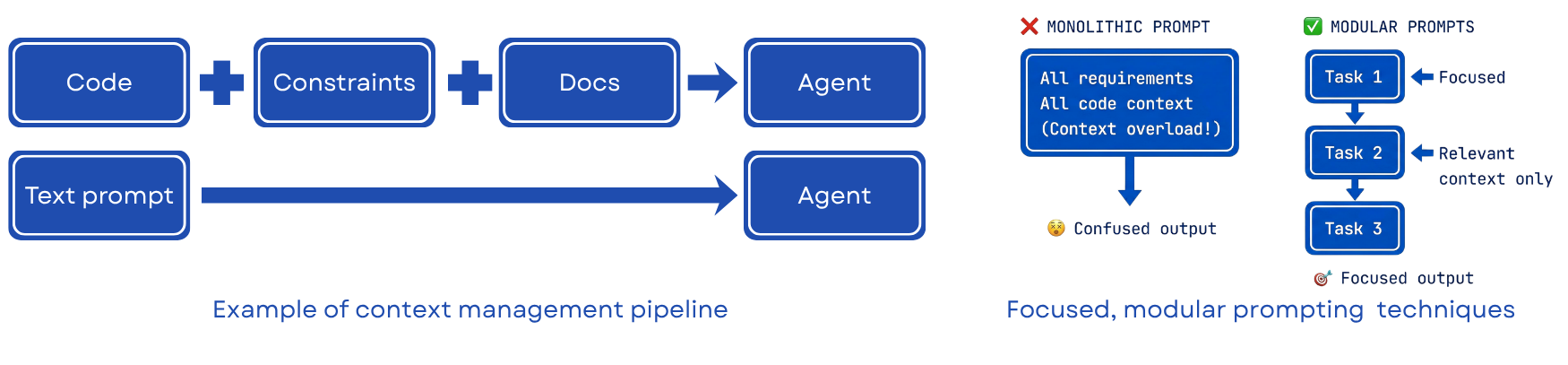
Intent
Problem
Pattern
Correct Use
Failure Mode If Skipped
Rationale
Effective agent performance depends heavily on context quality. If a task requires understanding four modules, the agent should receive those four modules rather than an incomplete or generic summary.
Context also has a cost. Long conversations accumulate previous messages and tool outputs, which increases both token usage and the risk of degraded focus. In many cases, a fresh, well-scoped session is more reliable than a long, accumulated one.
Three recurrent failure modes motivate this pattern:
| Failure Mode | Description |
|---|---|
| Cost and latency spiral | Model cost and time-to-first-token grow quickly with context size; verbose history and tool output make sessions slow and expensive |
| Signal degradation | Irrelevant logs, stale outputs, and deprecated state distract the model from the current task |
| Physical limits | Full retrieval results, intermediate artefacts, and long conversation traces eventually exceed practical context limits |
The main point is simple: more context is not always better context.
How to Apply the Pattern
Treat context management as a deliberate design choice rather than as an afterthought.
- Identify the minimum code, constraints, and artefacts needed for the current task.
- Include only those materials in the working context.
- Summarize or externalize information that should persist beyond the current session.
- Start a fresh session when accumulated context begins to dilute the task.
- Re-load authoritative artefacts rather than relying on conversational memory.
In practice, this means controlling both what enters the context window and what is preserved outside it.
Supporting Practices
Curate Context Deliberately
Before engaging an agent, deliberately load what it needs and exclude what it does not.
What to include:
- Code the agent should modify or reference
- Technical constraints such as language versions or framework requirements
- High-level goals and invariants
- Examples of good solutions or existing patterns
- Warnings about approaches to avoid
- API documentation for niche or unfamiliar libraries
What to exclude:
- Unrelated modules
- Generated files and build outputs
- Boilerplate that follows standard patterns and adds little signal
Useful context strategies include chunking, summarization, retrieval on demand, and active pruning.
Use Reusable Context Packages
Package domain expertise, constraints, and recurring procedures into reusable artefacts that agents can load repeatedly.
---
name: commit-messages
description: Generate commit messages following our team's conventions.
---

# Commit Message Format

All commits follow conventional commits:
- feat: new feature
- fix: bug fix
- refactor: code change that neither fixes nor adds
- docs: documentation only
- test: adding or updating tests

Format: `type(scope): description`
Not all context contributes equally. Higher-quality context should be preferred and lower-quality context should be pruned aggressively.
| Quality | Context Type | Effect |
|---|---|---|
| High | Code + tests + error messages | Precise, verifiable, model reasons well |
| Medium | Architecture docs, design notes | Helpful but requires interpretation |
| Low | Vague natural language descriptions | Easily misinterpreted, leads to assumption propagation |
Use Artefacts as Handles
For large data (retrieval results, documents, generated artefacts), do not embed the full content in the prompt. Instead, store the data externally and provide only a lightweight reference (a name and summary). The agent loads the raw content explicitly when it needs it. This pattern:
- Keeps the working context lean
- Prevents stale data from occupying context space after it is no longer needed
- Allows the same artefact to be referenced across multiple sessions
Reinject Key Constraints in Long Sessions
In long sessions (50+ turns), key constraints established early in the conversation lose influence as they are displaced by newer context. Use periodic context reinjection (reminders): re-inject key constraints, the current spec, or the session goal every N turns to counteract context degradation. Some agentic tools support this natively; in others, manual reinjection is required.
Prefer Modular Over Monolithic Prompting
Avoid loading all requirements, all code context, and all constraints into a single prompt. This causes context overload and produces confused, inconsistent output. Instead, structure each agent interaction around a focused, scoped task with only the context that task requires.
Monolithic: all requirements + all code + all constraints -> context overload -> lower-quality output

Modular:    Task 1 (focused context) -> clearer output
            Task 2 (relevant context only) -> clearer output
            Task 3 (scoped context) -> clearer output
In tools that support it, use explicit file selectors (e.g., #file:SKILL.md #file:plan.md) to load precisely what is needed. For example:
#file:SKILL.md #file:2026-01-28-feature-plan.md
Please implement phase two of the project using the skill and plan attached.
This is more reliable than describing what the agent should know and hoping it infers correctly.
Maintain Reusable Skills Carefully
Store reusable context packages (Skills) in .github/skills/ in the repository. This makes them discoverable across sessions and team members without requiring re-prompting.
Skills development process: Skills are most useful when they are derived from repeated practice rather than created speculatively.
- Do a task with your agent using normal prompting — notice what context you repeatedly provide
- Ask the agent to package that repeated context into a Skill
- Test with a fresh agent instance (zero prior context) on a real task
- Observe where the fresh agent struggles → bring those gaps back to the original session → refine the Skill
- Repeat until the Skill is self-sufficient
Testing with a fresh agent instance is the main quality gate. If a skill works only when additional verbal explanation is provided, it is not yet self-sufficient.
Example Skills from a mature codebase (stored in .github/skills/):
Many of the examples below are drawn from or adapted from Superpowers, an open repository of agent-oriented development skills and workflows.
| Skill | Purpose |
|---|---|
writing-plans |
Create bite-sized implementation plans with exact file paths, TDD steps, and commit commands |
executing-plans |
Step through a plan task-by-task, dispatching fresh subagents, with two-stage review |
brainstorming |
Turn rough ideas into validated design documents through one-question-at-a-time dialogue |
subagent-driven-development |
Orchestrate fresh subagents per task with spec and quality review |
systematic-debugging |
Structured approach to diagnosing and fixing bugs without guessing |
test-driven-development |
TDD step cadence with verification at each stage |
using-git-worktrees |
Create and manage isolated working directories per feature or agent session |
verification-before-completion |
Checklist for confirming a task meets spec before marking it done |
writing-skills |
Meta-skill for packaging expertise into new Skills |
Common skills to define early: commit message conventions, testing patterns, code style examples, deployment procedures.
Distinguish Context Memory from Persistent Memory
Agent memory operates on two fundamentally different tiers. Confusing them — or relying exclusively on one — is a common source of lost context and repeated mistakes.
| Tier | Location | Lifetime | Cost |
|---|---|---|---|
| Context memory | In the context window | Current session only | Per-token, charged on every turn |
| Persistent memory | Files on disk | Survives across sessions | Written once, loaded on demand |
Context memory is ephemeral and expensive. Everything in the window is re-processed on every turn. Constraints stated only in conversation disappear when a new session begins.
Persistent memory is durable and comparatively inexpensive. A constraint written into a file can be reused in future sessions simply by loading that file into context.
Persistent Memory Artefacts
| Artefact | Purpose | When to Update |
|---|---|---|
Agent config (CLAUDE.md, agent.md, .cursorrules) |
Constraints, anti-patterns, and conventions the agent must follow | Every time a new issue or pitfall is encountered |
Specification (spec.md, requirements.md) |
What to build and acceptance criteria | Before tasks; after any scope change |
Plan (plan.md, task-list.md) |
Sequence of steps and current progress | At session start and after each completed step |
Architecture decisions (DECISIONS.md, ADR/) |
Why things are structured the way they are | When design decisions are made |
Skills (.github/skills/) |
Reusable expertise packages (style, conventions, procedures) | When repeatable patterns emerge |
Session state (CONTEXT.md, TODO.md) |
Current position in a long task | At session start and end |
Using explicit file selectors ties these tiers together at the point of use:
#file:CLAUDE.md #file:specs/auth-spec.md #file:plan.md
Implement the next step in the plan, following all constraints in CLAUDE.md.
This is more reliable than re-describing constraints conversationally: you load authoritative, version-controlled files instead of paraphrasing from memory.
Use Agent Configuration as Living Memory
The agent configuration file is not a one-off setup artefact. It is a feedback mechanism through which knowledge about the codebase persists beyond a single session.
The agent config (.github/copilot-instructions.md, CLAUDE.md, .cursorrules, or equivalent) should usually be structured around five areas:
- Commands — exact commands with flags:
pytest -v,npm run build. Not just tool names. - Code style — one real code snippet showing the preferred pattern. Examples outperform prose descriptions.
- Project structure — specific stack details with versions.
- Testing — the test framework, the run command, and firm boundaries (e.g., never remove a failing test).
- Git workflow — commit convention, branch strategy, what to do before pushing.
Apply the three-tier model to define the agent’s operational boundaries:
| Tier | Description | Examples |
|---|---|---|
| Always do | Default behaviour, no permission needed | Follow style examples, run linter, write tests |
| Ask first | Requires human confirmation before proceeding | Database schema changes, adding dependencies, modifying CI/CD |
| Never do | Prohibited regardless of instruction | Commit secrets, modify production configs, delete tests |
Start minimal and grow it through use:
1. Start a task
2. Notice a mistake or violated constraint
3. After the task: add it to the config as a named constraint or anti-pattern
4. This knowledge is now permanent — every future session begins with it loaded
The contrast with context memory is straightforward: a constraint added to the configuration file can be reused in future sessions, whereas a constraint established only in conversation disappears when the session ends.
Incremental refinement is usually more effective than attempting to design a complete agent configuration in advance.
Example growth trajectory:
| Stage | Config Contents |
|---|---|
| Day 1 | Project name, language, framework |
| Week 1 | Preferred patterns, banned libraries, style rules |
| Month 1 | All anti-patterns discovered during development (the “don’t do this” list) |
| Month 3+ | Full constraint library representing accumulated team knowledge |
In mature use, the configuration file becomes a form of team memory: constraints and lessons captured by prior work become available to later sessions and contributors.
What belongs in the config (vs in a spec or skill):
| Content Type | Where It Lives |
|---|---|
| Constraints the agent repeatedly violates | Agent config |
| Dangerous patterns for this specific codebase | Agent config |
| Preferences about style or process | Agent config |
| What to build | Specification file |
| How to build (step-by-step) | Plan file |
| Repeatable procedural expertise | Skills file |
Practices
- Curate context upfront rather than relying on implicit conversational carryover
- Use markdown or similar project artefacts as durable memory between sessions
- Summarize completed work before moving to the next task
- Keep specification files updated as sources of truth
- Prune old or irrelevant context actively
- Provide documentation for niche libraries rather than assuming model familiarity
- Include reference implementations where codebase conventions matter
- Start fresh agents or sessions often when scope changes or context degrades
- Use selective inclusion with explicit exclusion
- Capture recurrent mistakes or constraints in the agent configuration promptly
Anti-patterns
- Dumping entire codebases into context
- Not summarizing before context overflow
- Relying on agents to remember across sessions
- Including irrelevant files in context
- Assuming the agent knows niche or new APIs without documentation
- Making agents guess at constraints they cannot observe
- One-off prompts for repeatable tasks instead of reusable artefacts
Indicators
- Frequency of context-related mistakes or hallucinated continuity across sessions
- Time spent re-establishing project context in new sessions
- Size of task-scoped context relative to the full repository
- Number of durable artefacts reused across sessions